
Frontline Education
Frontline EducationEducation
4.72.23K Reviews
- Version
- 11.11.1
- Installs
- 500.00K
- Age Rating
- Everyone
Screenshots

Our Review of Frontline Education
 Analysis by Appyee
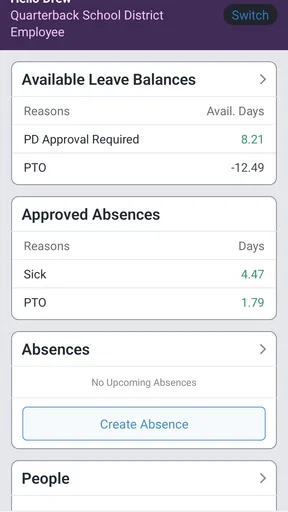
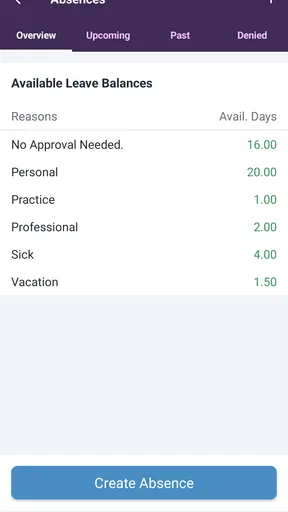
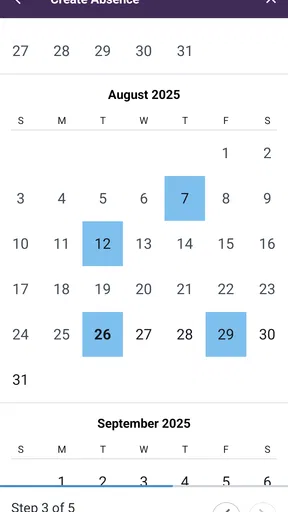
Frontline Education is an education app from Frontline Education that I see as a practical companion for staff who already use the company’s workplace systems. Its main job is not to entertain or teach a lesson in the usual sense. Instead, it puts everyday absence management in a more convenient place, allowing users to check leave balances, arrange absences, and handle related tasks without always sitting at a computer.
That narrow purpose is also the key to understanding it. I would not install this expecting a broad school-planning suite or a personal productivity app. Its value depends on whether your employer uses Frontline Education and whether your role requires regular interaction with leave or absence scheduling. When that connection exists, the app can earn a permanent place on a phone because it solves a recurring administrative problem. When it does not, there is little reason to keep it around.
I tested it with that long-term question in mind: does the convenience survive after the first few days? My answer is mostly yes, but with an important condition. The app is strongest when it becomes part of a simple routine—checking available leave before making plans, submitting an absence as soon as it is known, and reviewing the result later. It is less impressive as a general-purpose education tool because its role is focused and dependent on an organization’s setup.
How Frontline Education fits into a real work routine
I find that Frontline Education makes the most sense when I treat it as one stop in a work routine, not the whole routine. A quick balance check can inform a decision, while a personal calendar can show how the date affects everything else. That distinction helps set realistic expectations; next, it is worth looking at how comfortably the app supports different ways of reading and navigating.
The first-week appeal is immediate convenience
The first thing I appreciated was the reduction in small administrative steps. If I need to know how much leave I have available or schedule an absence, opening a phone app feels more natural than waiting until I am back at a desktop. That matters for teachers and other school employees whose working day is often divided between classrooms, meetings, corridors, and travel. A quick check during a suitable break can be more realistic than remembering to deal with it later.
The app’s store summary points directly to those tasks, and that focus is reflected in the experience. It does not try to turn a straightforward workplace action into a complicated workflow. For a user who already knows the organization’s absence process, the app can feel like a shorter route to something that otherwise gets postponed.
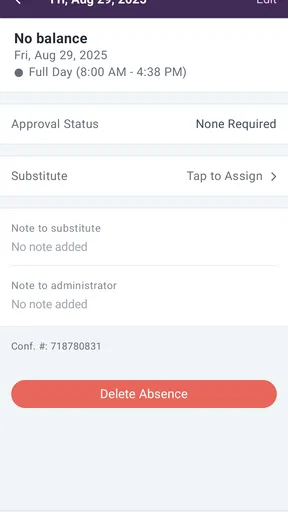
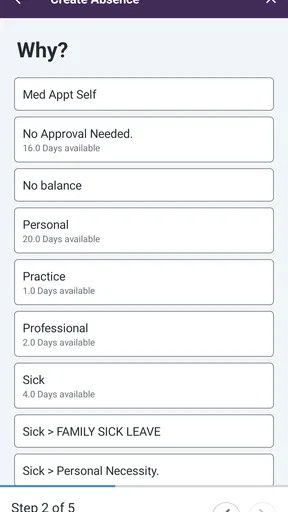
A realistic example is a teacher who wakes up unwell before leaving home. Rather than waiting to reach a school computer, the teacher can use the phone to review the relevant leave information and schedule the absence. The advantage is not dramatic technology; it is timing. The request can be handled while the details are fresh, reducing the chance of forgetting it during a busy morning.
That same scenario reveals a useful habit: I would use the app to confirm the status of an absence after submitting it, rather than assuming that tapping a final button means every part of the process is complete. Workplace systems can involve approval steps or local rules, so treating the app as a place to record and review information—not as a replacement for knowing your employer’s procedure—is the safer approach.
Frontline Education is free to download, and its content rating is Everyone, which makes it approachable for the broad staff audience it serves. It runs on devices using Android 8.0 or later. Those requirements are not demanding for many current phones, although anyone using an older device should check compatibility before relying on it for time-sensitive requests.
What makes it useful beyond the novelty period
Many workplace apps feel worthwhile during the first week because they are new, then disappear into a folder. This one has a better chance of lasting because leave management is repetitive by nature. People take time off, adjust plans, and need to remember what they have already submitted. A tool that keeps those actions accessible can remain useful even when it is opened only occasionally.
The strongest recurring use is checking before making a commitment. I would rather look at my balance before arranging a trip or requesting a day away than discover later that my available leave does not match my assumption. That small check can prevent an avoidable conversation with an administrator. It also turns the app into a planning aid, not merely an emergency absence button.
Another worthwhile workflow is using it immediately after a schedule changes. If a planned absence is no longer needed, or if a new absence becomes necessary, handling the update while the change is still clear is more reliable than keeping a note in a separate calendar and hoping to transfer it later. The app’s value here comes from being close to the moment when the decision is made.
I also found that it works best when paired with, rather than substituted for, a personal calendar. The app is the place for official leave information and absence actions; a calendar is better for seeing how those dates affect appointments, family arrangements, or travel. Keeping those roles separate avoids a common mistake: assuming that an official request automatically gives you the broader visual planning tools found in a calendar app.
Month-to-month value depends on repeated small checks
After the initial setup, the experience becomes less about discovery and more about reliability. I would not expect to explore it every day. Its month-to-month value comes from opening it at the right moments: before requesting leave, when an absence occurs unexpectedly, and when checking that a previous action is reflected correctly.
That pattern suits school staff better than a system that demands constant attention. There is no need to build a complicated productivity ritual around it. A short review before a busy period or before finalizing personal plans is enough to make the app useful. In my view, that is a strength because the best administrative tool often stays out of the way until it is needed.
The app has a 4.7 average from around 4.7 thousand ratings, with roughly 2.2 thousand written reviews. Those figures suggest that many users find the focused experience worthwhile, although a rating alone cannot tell you whether it fits your particular employer’s workflow. The important question is not whether other people like the interface in general; it is whether your organization’s Frontline setup gives you the actions and information you actually need.
Its reach is also substantial, with over 500 thousand installs. That makes it easier to view the app as an established tool rather than a short-lived experiment. Still, adoption does not remove the central dependency: the app is useful because it connects to an institutional process. A person without that connection will not receive the same value simply by installing it.
The maintenance burden is low, but not invisible
For long-term use, maintenance is mostly about keeping the app available and remembering which tasks belong there. I would keep notifications or reminders under personal control rather than allowing every possible alert to interrupt the day. The right balance depends on how often your workplace expects you to respond, but the general principle is simple: let the app support your routine without becoming another source of noise.
It is also worth checking the app before an important absence is urgent. Opening it occasionally helps confirm that you can sign in, recognize the current workflow, and find the relevant area without learning everything during a stressful morning. This is one of the less obvious advantages of occasional maintenance: a two-minute check can be more valuable than discovering a problem when you are already late or unwell.
The current version is 11.11.1, and the app was released on March 6, 2017. Those details place it in the category of a mature workplace app rather than a brand-new service. Maturity can be reassuring because the core use case is established, but it can also mean that the experience feels functional instead of especially modern. I would judge it by whether it completes the necessary task clearly, not by whether it offers the visual polish of a consumer social app.
Because Frontline Education is tied to an organization, account and access issues may be more significant than the app itself. If a user cannot reach the right workplace information, reinstalling the app is unlikely to solve every problem. I would first verify the organization’s process and account details, then use the app as the mobile part of that system. This distinction saves time and prevents blaming the phone application for an administrative issue elsewhere.
Where fatigue can appear over time
The main source of fatigue is repetition without much flexibility. If your daily work requires more than checking leave and scheduling absences, you may find yourself switching to other tools for calendars, messages, documents, or detailed planning. That is not necessarily a flaw; it is the result of a focused design. But it does mean the app will not become a single destination for every work-related need.
I can also imagine frustration when a user expects immediate certainty from a request. An app can make it easier to submit information, but workplace decisions may still follow local approval rules. If someone treats a submitted absence as automatically finalized, the convenience can create confusion rather than remove it. My practical advice is to review the resulting status and follow any separate instructions from the employer.
Another trade-off is occasional use. Apps that are opened only once every few weeks are easy to forget, especially when a person has several workplace tools installed. The solution is not to force daily use. Instead, I would keep it in a clearly named folder with other work apps and open it whenever a leave decision is made. That simple placement makes the app easier to remember when it matters.
Compared with calling an administrator or using a desktop portal, the mobile app is more convenient for quick checks and requests made away from a desk. Compared with a general calendar, it is better suited to official leave information but less suited to seeing a complete picture of personal commitments. Compared with a notes app, it provides a more appropriate home for formal absence actions, while a note remains useful only as a temporary reminder. The best alternative depends on whether the task is official recording, personal planning, or direct communication.
Who should use it, and who should skip it
I would recommend Frontline Education to teachers, school employees, and other staff whose organization uses Frontline Education for absence-related work. It is particularly suitable for people who are often away from a desk, who need to check leave before making plans, or who occasionally have to report an absence at short notice.
I would be more cautious if you rarely manage leave yourself or if your workplace has not directed you to use Frontline Education. Installing it without an organizational connection is unlikely to produce meaningful benefits. I would also skip it as a replacement for a calendar, task manager, or communication app. Those tools solve different problems, and forcing this app to cover them would make the overall workflow less clear.
For a manager or administrator, the app may be useful as part of a broader staff process, but I would not assume that the mobile experience alone replaces every desktop function. The best fit is the employee who needs convenient access to routine absence actions, not someone looking for a complete human-resources dashboard on a phone.
My long-term verdict
After the novelty fades, Frontline Education earns space on my phone for one reason: it handles a recurring workplace need at the moment that need appears. It is not an app I would open for entertainment or casual browsing, and it does not need to be. Its success comes from making leave checks and absence scheduling less dependent on being at a particular computer.
The lasting value is strongest when I use it with a simple three-part habit: check available leave before committing to plans, record changes promptly, and review the outcome instead of relying on memory. That workflow turns a modest utility into something dependable. It also keeps expectations realistic, because the app supports the official process without pretending to replace every calendar, approval, or communication step around it.
My final recommendation is positive for the intended audience. Frontline Education is worth keeping when your workplace already relies on it and you regularly need mobile access to absence information. Its free availability, Everyone rating, broad installation base, and focused purpose make it easy to try. Just remember that the app’s usefulness is institutional, not universal: if your employer does not use the Frontline system, or if you need a full planning and communication suite, another tool will serve you better.
In short, I would describe it as a practical education-workplace utility rather than a feature-packed platform. Its strongest quality is the ability to remove a small but recurring point of friction. Its main limitation is the same narrow focus that makes it dependable. For the right user, that is enough to justify a lasting place on the phone.
Verdict
Strengths of Frontline Education
- Centralizes school, district, and staff information in one platform.
- Useful tools for absence reporting and substitute teacher management.
- Helps educators access schedules, tasks, and workplace resources remotely.
- Supports communication between employees and school administrators.
- Available on mobile devices for quick access while away from a desk.
Limitations of Frontline Education
- Some features may be unavailable unless your organization subscribes to them.
- The interface can feel complex for first-time users.
- Login or access issues may require help from your school administrator.
- Notifications may become overwhelming when several modules are enabled.
- Performance and available tools can vary between school districts.
Similar Picks in This Category
View All
Duolingo: Language Lessons
Duolingo4.7

Google Classroom
Google LLC2.8

Unacademy: Learn & Crack Exams
Unacademy3.2

Bible App for Kids
Life.Church4.4

Cake - Learn English & Korean
Cake Corp.4.7

Brainly: AI Homework Helper
Brainly4.5
Frequently Asked Questions
What is Frontline Education used for?
Frontline Education is a platform designed to help school districts and education organizations manage administrative and workforce-related tasks. Depending on the services enabled by your district, it may provide access to employee information, absence reporting, substitute management, professional growth, recruiting, timekeeping, or other school operations. The features available to you depend on your organization’s subscription and account permissions.
Can I use Frontline Education on my Android or iPhone?
Yes, Frontline Education services can generally be accessed from mobile devices, although the exact experience depends on the specific Frontline product your school district uses. Some functions may be available through a dedicated mobile app, while others may open through a mobile browser. Before downloading, check that your district supports the relevant app and that your device meets the current Android or iOS requirements.
How do I sign in to Frontline Education?
To sign in, you normally need an account provided or activated by your school district, employer, or education organization. Open the app or official Frontline login page, enter your organization credentials, and complete any requested verification steps. If you cannot sign in, confirm that you selected the correct Frontline product and contact your district administrator, since account access is usually managed by the organization.
Is Frontline Education free to download and use?
The availability and cost of Frontline Education depend on your role and organization. Employees, teachers, substitutes, and administrators typically access services through a district or employer subscription, so there may be no separate personal charge for using the features assigned to them. However, downloading an app does not guarantee access, and mobile data charges may apply when using the service away from Wi-Fi.
What should I do if Frontline Education is not working correctly?
If Frontline Education is not loading or a feature is unavailable, first check your internet connection, update the app or browser, and restart your device. It is also worth confirming that the service is not experiencing an outage and that you are using the correct login details. If the problem continues, contact your school district’s Frontline administrator or official support channel, as they can verify permissions and account settings.
